
Healthy
Track heart health and daily vitality with gentle reminders that keep you consistent.
Wellbeing tracker
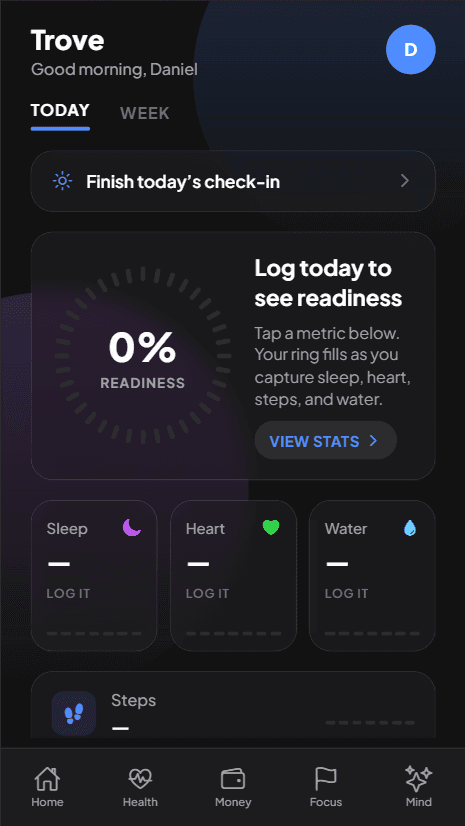
Everything that matters for your daily health in one calm, dark-themed dashboard. Track sleep, heart rate, daily steps, and recovery routines — built 100% offline-first for Android.
Version 1.0.7 · Sep 17, 2026
Track heart health and daily vitality with gentle reminders that keep you consistent.
Build better routines with timely check-ins for sleep, meals, and recovery.
Log workouts and strength progress so every session moves you forward.
Celebrate milestones and stay motivated with goals that feel rewarding.
Features
A calm home screen with a readiness ring that fills as you log the day — not a noisy feed.
Tap a metric, enter today’s number, and see how you’re doing at a glance.
A short check-in keeps sleep, meals, and recovery honest without becoming a chore.
Keep the few habits that matter on a simple list, next to the metrics you already track.
Look back across days so streaks and dips are easy to notice.
Log on the go without signal. When you’re back online, everything syncs to your account.
How it works
Step 1
Get Trove from this website. You don’t need the Play Store.
Step 2
Open the file and confirm when Android asks you to install it.
Step 3
Create an account with email or Google and start logging your day.
Download
Install Trove from this website. Android will ask you to confirm before anything is installed.
Direct link: https://trove.qeintech.com/cdn/releases/latest.apk
FAQ
Not right now. You download it from this website and install it on your Android phone.
Download from this site, open the file, and allow the install when Android asks. You’ll always see a system confirmation before anything is installed.
Yes. When a newer version is available, Trove can download it and ask Android to install it. Smaller improvements may apply quietly. More detail is on the Updates page. How updates work
Yes. You can log metrics and check-ins without internet. Changes sync when you’re back online.
Yes — email and password, or Google. That keeps your data available if you switch phones.
Your logs stay on your phone first and sync to your account. This website doesn’t run ads or extra trackers. See Privacy for the full picture. Privacy